
YubiKey Security Keys for Microsoft 365 & Passwordless MFA
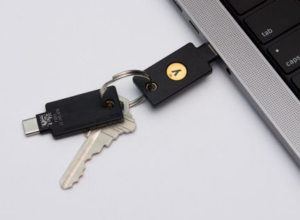 Traditional two factor authentication (2FA) methods such as mobile authentication apps or one-time passcodes (OTPs) sent via text messages are susceptible to advanced threats and phishing attacks. This threat can be mitigated by generating a unique physical cryptographic key that is virtually impossible to replicate, making it extremely challenging for hackers to steal passwords or personal information. YubiKey is designed to help protect Kiwi businesses against these modern authentication threats.
Features
A small USB device that enhances the widely used two-factor authentication (2FA) method to secure online accounts.
User-friendly and highly secure. It works seamlessly with multiple services, allowing for quick and efficient authentication of identity and account access. It generates one-time passcodes within seconds, eliminating the need for recurring subscription fees or additional hardware.
Does not require any battery or cellular activity, and it is crush and water-resistant, ensuring durability and longevity.
YubiKey supports modern phishing-resistant authentication standards including FIDO2 and WebAuthn.
A cost-effective way to protect online accounts and sensitive information from unauthorised access.
Enjoy a strong multi-factor passwordless with pin authentication and have peace of mind knowing that your online accounts are secure.
Why Businesses Are Moving to Phishing-Resistant MFA
Cyber attacks targeting Kiwi businesses are becoming more sophisticated every year, and traditional passwords are no longer enough to protect Microsoft 365 accounts and sensitive business data.
Do you still rely on:
- passwords alone
- SMS verification codes
- mobile authenticator apps
While these methods improve security, they can still be vulnerable to:
- phishing attacks
- credential theft
- MFA fatigue attacks
- social engineering
That’s why businesses are moving to phishing-resistant multi-factor authentication (MFA) solutions like YubiKey to better protect accounts, staff, and business systems.

Frequently Asked Questions
What is a YubiKey and how does it work?
A YubiKey is a physical security key designed to protect your online accounts using multi-factor authentication (MFA) and passwordless login technology. Instead of relying only on passwords or mobile authentication apps, a YubiKey provides a secure hardware-based authentication method that helps prevent phishing attacks and account compromise.
YubiKeys work by connecting via USB, NFC, or Lightning and using cryptographic authentication standards such as FIDO2, WebAuthn, and OTP to verify your identity securely.
Can Yubikey prevent phishing attacks?
Yes. YubiKey is designed to provide phishing-resistant authentication by verifying the legitimacy of the website or service before authenticating the user. Unlike SMS codes or mobile authenticator apps, YubiKey helps protect businesses against credential theft, fake login pages, and phishing attacks targeting Microsoft 365 accounts.
Is YubiKey better than Microsoft Authenticator?
YubiKey is generally considered more secure than app-based authenticators like Microsoft Authenticator because it provides phishing-resistant authentication using hardware-based security.
Microsoft Authenticator relies on a mobile device, which can still be vulnerable to:
- phishing attacks
- SIM swapping
- device compromise
- MFA fatigue attacks
A YubiKey requires physical possession of the key, making it significantly harder for attackers to gain unauthorised access.
Many organisations use YubiKey alongside Microsoft 365 and Azure Active Directory (Azure AD) to improve cyber security and support passwordless authentication.
Does YubiKey work with Microsoft 365?
Yes. YubiKeys integrate with Microsoft 365, Office 365, and Azure Active Directory (Azure AD).
Businesses commonly use YubiKeys to secure:
- Microsoft 365 accounts
- Outlook email
- Teams
- SharePoint
- OneDrive
- remote access systems
YubiKeys also support passwordless sign-in for Microsoft environments using FIDO2 authentication.
What is passwordless authentication?
Passwordless authentication allows users to securely log in without entering a traditional password.
Instead of passwords, users authenticate using:
- a YubiKey security key
- biometrics
- device-based cryptographic authentication
Passwordless login reduces the risk of:
- weak passwords
- password reuse
- phishing attacks
- stolen credentials
It is becoming a leading cyber security best practice for businesses and organisations worldwide.
What accounts can I protect with a YubiKey?
YubiKeys support hundreds of services and platforms, including:
- Microsoft 365
- Google Workspace
- Gmail
- Dropbox
- X (Twitter)
- GitHub
- AWS
- Salesforce
- password managers like Keeper and LastPass
Many enterprise applications also support YubiKey integration using FIDO2 and WebAuthn standards.
Can I use a YubiKey on my phone?
Yes. Many YubiKeys support:
- NFC for Android devices
- Lightning for iPhone and iPad
- USB-C for modern smartphones and laptops
This allows secure authentication across desktops, laptops, tablets, and mobile devices.
What happens if I lose my YubiKey?
If you lose your YubiKey, you can still regain access using:
- a backup YubiKey
- recovery methods configured during setup
- administrator recovery processes
Most businesses recommend registering at least two YubiKeys per user:
- a primary key
- a backup key
This ensures secure account recovery while maintaining strong protection.
Is YubiKey suitable for my business?
Yes. YubiKeys are widely used by businesses, government, and healthcare providers to strengthen cyber security and reduce the risk of credential-based attacks.
Benefits for businesses include:
- phishing-resistant MFA
- secure remote work access
- passwordless authentication
- reduced cyber security risk
- compliance support
- improved identity protection
YubiKeys are especially valuable if you are using Microsoft 365 and cloud-based systems.
What is the difference between MFA, 2FA, and passwordless login?
- 2FA (Two-Factor Authentication) uses two verification methods, such as a password and a security key.
- MFA (Multi-Factor Authentication) uses two or more authentication factors for stronger protection.
- Passwordless authentication removes passwords entirely and relies on secure authentication methods like YubiKeys or biometrics.
Passwordless authentication is considered more secure because passwords are often the weakest point in cyber security
Should I move my business to phishing-resistant MFA?
Traditional MFA methods like SMS codes and mobile authenticator apps are increasingly targeted by attackers using phishing kits and social engineering techniques.
Phishing-resistant MFA solutions like YubiKey can help your business:
- prevent credential theft
- protect Microsoft 365 accounts
- secure remote workers
- improve compliance
- reduce cyber security incidents
Many cyber insurance providers and security frameworks now recommend phishing-resistant authentication as a best practice.
Key Benefits
Integrates with Office 365 for MFA
Immediate access to all of your Microsoft account at a touch of a button.
Azure AD Passwordless Login for Laptops and Desktops
Effortless, cross platform and highly secure logins achieving better security without compromising usability.
Support Password Vaults
Can be used with popular password managers such as Keeper, LastPass and Dashlane for seamless integration and enhanced security.
Integrates with Other Main Third Parties
AWS, Google, Apple iCloud, Facebook, Twitter, DocuSign, GitHub, Dropbox and much more.
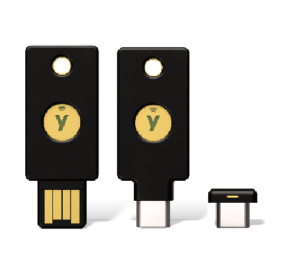

Secure Your Business with YubiKey.
BTG can help your business deploy phishing-resistant MFA, passwordless Microsoft 365 authentication, and secure remote access using YubiKey security keys.